Tumblr Archive Project
For the sake of archiving + if anyone is interested in the devlog process ... I began a project of archiving some of my tumblr blogs using TumblBee (which massive thanks to Cari for creating the app in the first place!) as it exports blogs as either HTML, or markdown files.
I'm mostly doing it for my roleplay blogs and archiving those, but I'm also wanting to do it for my own personal blog because it's uh ... 14 years old. It has basically half of my entire lifetime there, so it'd be a shame if something happened and that was all basically gone.
This isn’t like an exact unpacking of all the code I did do, more like trying to understand the export, what tools I did try and settle on, and how I present it. So not really a guide LOL.
What I've Tried To Do
Well, first things first was backing everything up. There are some bugs as of writing this where 1.2.8 has problems with freezing as it's exporting, but Cari was kind enough to put 1.2.7 up which does work. My personal blog and oldest roleplay blog have some issues just due to how posts formats changed over the decade, but my newest RP blog (Sylvie's) actually exported fine with ~9,000 original posts.
(I will have to test again with my older RP blog and personal blog, but I need to take note of the posts where it hiccups and throws an error, then skip over that day to avoid the messed up posts.)
Since they export as HTML and markdown, you can either keep them locally, put them in an Obsidian vault, or publish them in their HTML format since it comes with a simple CSS included that's quite pretty in terms of layout (albeit it shows all of the posts w/their untitled titles and not the content). So literally a complete site you can just put up as is, technically.
In TumblBee's documents, it mentions settings for exporting to Material for MkDocs, and to Quartz or Obsidian Pages. I've tried both MkDocs and Quartz, but found them cumbersome to work with because the tags were ... weird?
(MkDocs is actually really cool!! At least Material for it, it has a lot of nicely built in tools but it clearly is more catered towards wikis rather than blogs. It does have a plugin to support blogs though; this tutorial walking through it shows a lot of the awesome stuff you can do for a wiki.)
MkDocs has a tag page, but it didn't act like tumblr tags where you could click a link and see every post under that tag; the way it worked was more like ... one giant tag page with every tag, and the connected posts under them. Which ... for tumblr blogs where I comment in tags, is shit, to put it lightly. Genuinely I do not need a single tag for ‘#lmaoooo well he fucking sucked ass at it!!!’.
Quartz is cool but even with their blog layout it doesn't really work well with how the data exports. I use markdown primarily, and each 'post' is shown with its title. And ... tumblr posts ... don't have titles. Or rather, they're all 'untitled'. Quartz also doesn't expose the content of the post itself, so it was just a list of 'untitled' with their tags besides it.
... and so, it all cycles back to 11ty LMAO. I can't escape 11ty.
The 11ty Haul
I'm still working on it as of writing this, so it's kinda a living documentation in a way. Some things I won't fully cover because I already have a blog unpacking of 11ty on my site, and petrapixel's 11ty tutorial is the basics of where I always go to get started, and this was the initial tutorial I followed for setting up a blog.
Why not just do the HTML version? Eh. I like markdown, I've already worked with 11ty cause it makes the bones of my site, and I don't think I could easily create proper tag navigation using the HTML only export, or have pagination included, without then breaking in javascript.
So far it's been just ... import 11ty, import html-minifier, and markdown-it (since I primarily work in markdown with all of the exports).
The markdown files come with this basic information
---
title: 'Reblog'
date: 2026-08-05 20:03:39
state: published
tags:
- 'utdr'
- 'deltarune'
---
**[paradise-paradise](https://paradise-paradise.tumblr.com/):**
> 
> 
> (old) request from friend
- The 'title' aka there's no fuckin title
- The date it was published
- If it's a private, drafted, or published post (which I only archive my actual public posts) so it’s useless info at the moment
- What tags were used
This is an example of a reblog, mostly because I was trying to export various posts to dink with layouts; my final archives won't have all of my reblogs as well cause those poor things are ... *checks my personal* ... 45k posts.
Collections
Honestly, this is my first time really handling collections. I had no real reason to use them on my main site because... err, I didn't? My blog posts aren't on there, they're on Bear Blog (har har if you're reading this on there), and collections are mostly something you use when you're building things like blogs, archives, galleries, and so on.
Collections are literally what collects things together. Posts, files, or any other items you want to group into one pile.
eleventyConfig.addCollection("posts", function (collectionApi) {
    return collectionApi.getFilteredByGlob("src/post/*.md")
        .sort((a, b) => b.date - a.date);
});
Ugly lil thing, but the basics of this is:
I am a collection called
posts. I am finding every.mdfile withinsrc/post/. I am sorted by the date within, from newest to oldest.
So then I can just do this on the index:
{% for post in posts %}
    {% include "_partials/post-html.njk" %}
{% endfor %}
And now it has access to the posts collection.
You can also use:
{% for post in collections.posts %}
which is just a more explicit way of saying "use the collection called posts." This becomes useful if a page is using multiple collections and you want to make it obvious which one you're referencing. Or y'know, just for clarity as well.
This also helps me be able to sort through the data either by year, or by something like tags.
Like for example of looking through a specific year ...
{% set targetYear = 2026 %}
{% for post in collections.posts %}
    {% if post.date | dateYear == targetYear %}
        ...
    {% endif %}
{% endfor %}
(using a filter to get just the year based off the date)
eleventyConfig.addFilter("dateYear", function(date) {
	return new Date(date).getFullYear();
});
or a specific tag ...
{% set tag = "sylvie" %}
{% for post in collections.posts %}
    {% if tag in post.data.tags %}
        ...
    {% endif %}
{% endfor %}
Obviously this is setting the actual stuff manually, 11ty is capable of generating tags and years using pagination. Which is... a weird term, because in this case it isn't only being used for "page 1, page 2, page 3", since it's also a way to make multiple pages from a certain collection.
pagination:
  data: collections.tags
  size: 1
  alias: tag
This says:
Take every item in my tags collection and generate one page per item.
So instead of manually making:
/tag/sylvie/
/tag/art/
/tag/personal/
Eleventy generates them based on the tags it finds in the collection of tags I made. Collect-o-thon.
Years and months work the same way: create a collection that groups posts by date information, then make pages from it.
Aw God Image Links
... well one of the issues I met with was ... that image links are fucked depending if you look at the permalink page of the post, or the index, due to the folder structure.
/public - where 11ty exports to
   /img
   /posts
      post-1.html
      post-2.html
   index.html
/src - where i'm working
   /img
   /posts
      post-1.md
      post-2.md
   index.md
... and at the moment  is trying to look for an image folder that's inside of posts.
When I display the posts on the index, it WILL work because /img is relative to the index, but on a permalink page of the post, it doesn't. The thing is, I do not want to ctrl+f to replace stuff in the markdown.
So here steps in addFilter from 11ty. Aka replace text. There's a lot of cool lil things you can do with it.
// Fix image pathing due to being fucked on public
eleventyConfig.addFilter("fixTumblrImages", function (text) {
    return text.replaceAll('src="img/', 'src="/img/');
});
In this case it's just changing the finished HTML output (not the markdown, since it goes from markdown -> HTML when it's built -> the filter then changes that HTML) to reference the root of the folder. That way, regardless if it's the index or the permalink, it still has a path to follow.
Aw God Different Variables??
One of the issues that came up was that when going on a permalink post, where the date was, it’d say it’s invalid while it looked fine on the index.
Wanna know the problem?
Permalink pages aren't getting their post information from the collection loop.
The index has this:
{% for post in posts %}
	{% include "_partials/post-html.njk" %}
{% endfor %}
This loops through the collection of posts I made earlier, so post-html.njk gets a post containing all the information for that particular .... post.
A permalink page doesn't have that loop. It's already the page for that one post, so its information comes from the page itself.
The problem is that both of them use the same post-html.njk partial. Mostly so I don't need to double up on code.
So with this lil snippet inside of post-html.njk:
<h2>
    <a href="{{ postUrl }}">
        {{ postTitle }}
    </a>
</h2>
Then postTitle would need to know where its info came from which is the collection's title (if on the index), and its own title (if on the permalink). Which means this hodgepodge of variable assigning.
{% if post %}
    {% set postTitle = post.data.title %}
    {% set postTags = post.data.tags %}
    {% set postDate = post.data.date %}
    {% set postUrl = post.url %}
    {% set postContent = post.templateContent %}
{% else %}
    {% set postTitle = page.title %}
    {% set postTags = page.tags %}
    {% set postDate = page.date %}
    {% set postUrl = page.url %}
    {% set postContent = content %}
{% endif %}
The simplest explanation is:
If I am a post in the collection of posts on the index, please use my
post.data.[variable]info. If I am not a post, then use my own data from my own markdown file variables.
I also have no idea why collections use templateContent explicitly instead of just content (the content of the current file/page) but it works and I will not question it. I also realize keeping postTitle is kinda useless since I'm gonna remove that anyway off my CSS, but it's more to have it there just in case.
Pagination
Long story short it sucks dick to do it for tags and the archive. Crude wording but it did not work LOL. I got it working for the index because that uses the built in 11ty navigation using the collection of posts (with some fancy if/then statements to not have a page/1), but for tags? Fuck that.
I just genuinely could not figure it out nor could I find much info online that didn't feel like I was reading javascript gibberish. So tag and year/month pages will just show every post instead on the same page which whatever.
Maybe later on I may look into a ‘load all’ if there’s some code for it through javascript or something to load (x) amount of posts from a collection, but that’s such a low priority at the moment.
Final Thoughts?
 (Thank god for simple.css existing to make sites look nice quickly.)
I still actually need to export my blogs in the first place, but I do now have a proof of concept that it does work with a tiny sample of my personal blog posts. Probs other issues will come up, but I'm super excited about the concept of being able to have my posts backed up, and in a format that I can both carry with myself, and post online if like ... tumblr dies.
I definitely took the harder ground with making it into an 11ty SSG system but I'm pretty happy with it, and I actually (if I can get it exported right) might go for one of my oldest RP blogs first. I'd do Sylvie's but uh ... they have a custom tumblr theme.
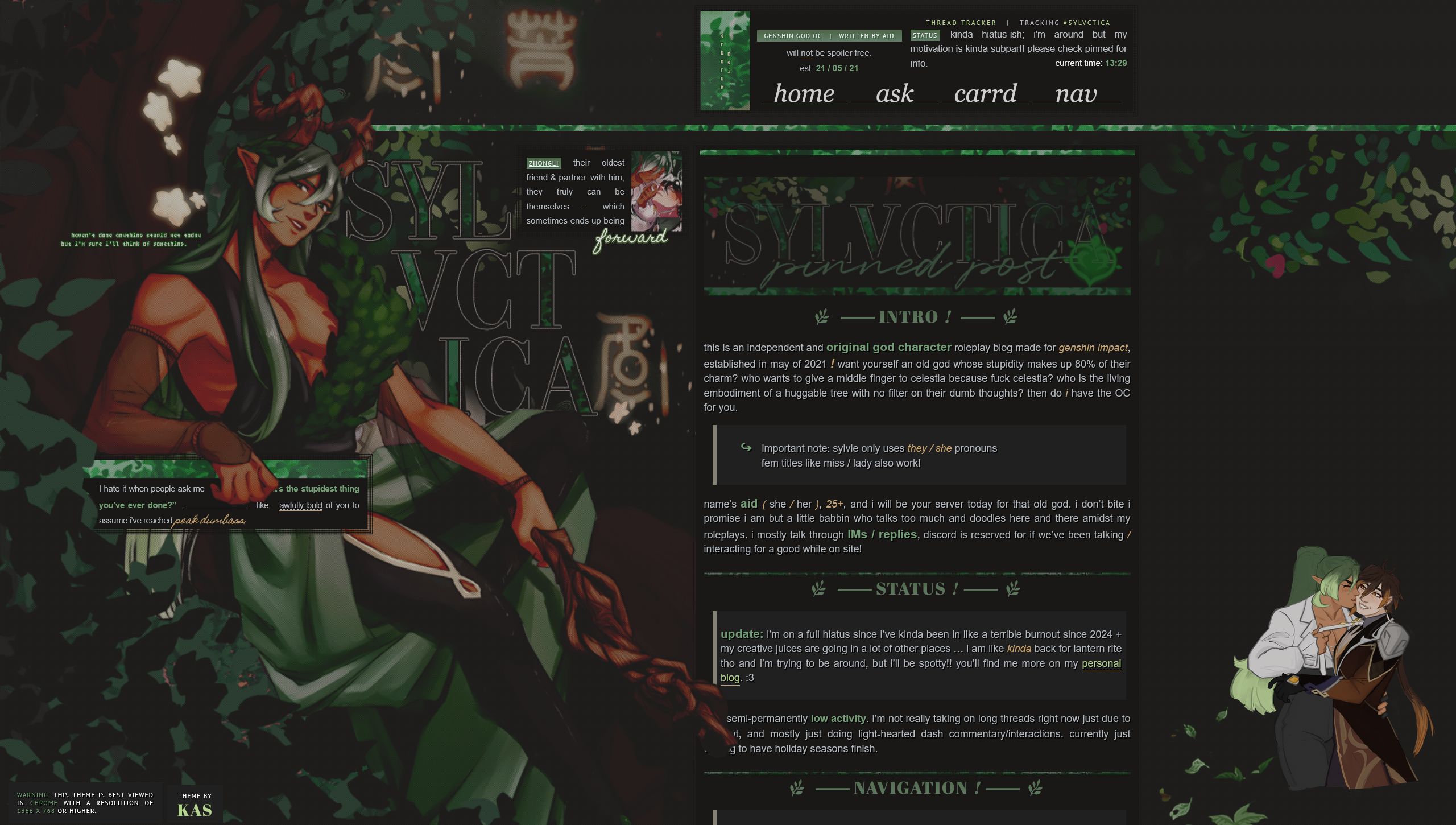
... and I do not want to remake this in CSS right now. 💀 Especially in converting it to be mobile friendly.
This is also on Dreamwidth if you wanna comment!